
To measure LLM visibility, run a fixed prompt set several times in each AI assistant and report how often your brand is named and linked, with settings stated.
If an agency or tool just handed you an AI visibility report, this page shows how to check it (what to require). Wondering how to measure LLM visibility on your own? The steps work by hand.
The Short Answer: How to Measure LLM Visibility
Measure LLM visibility with three numbers: mention rate, citation rate and AI share of voice, each calculated from repeated runs of the same prompt set.
- Mention rate: the share of responses in which the assistant names your brand.
- Citation rate: the share of responses that link your domain as a source.
- AI share of voice: your share of all mentions among you and 3 to 5 named competitors, counted in the same responses.
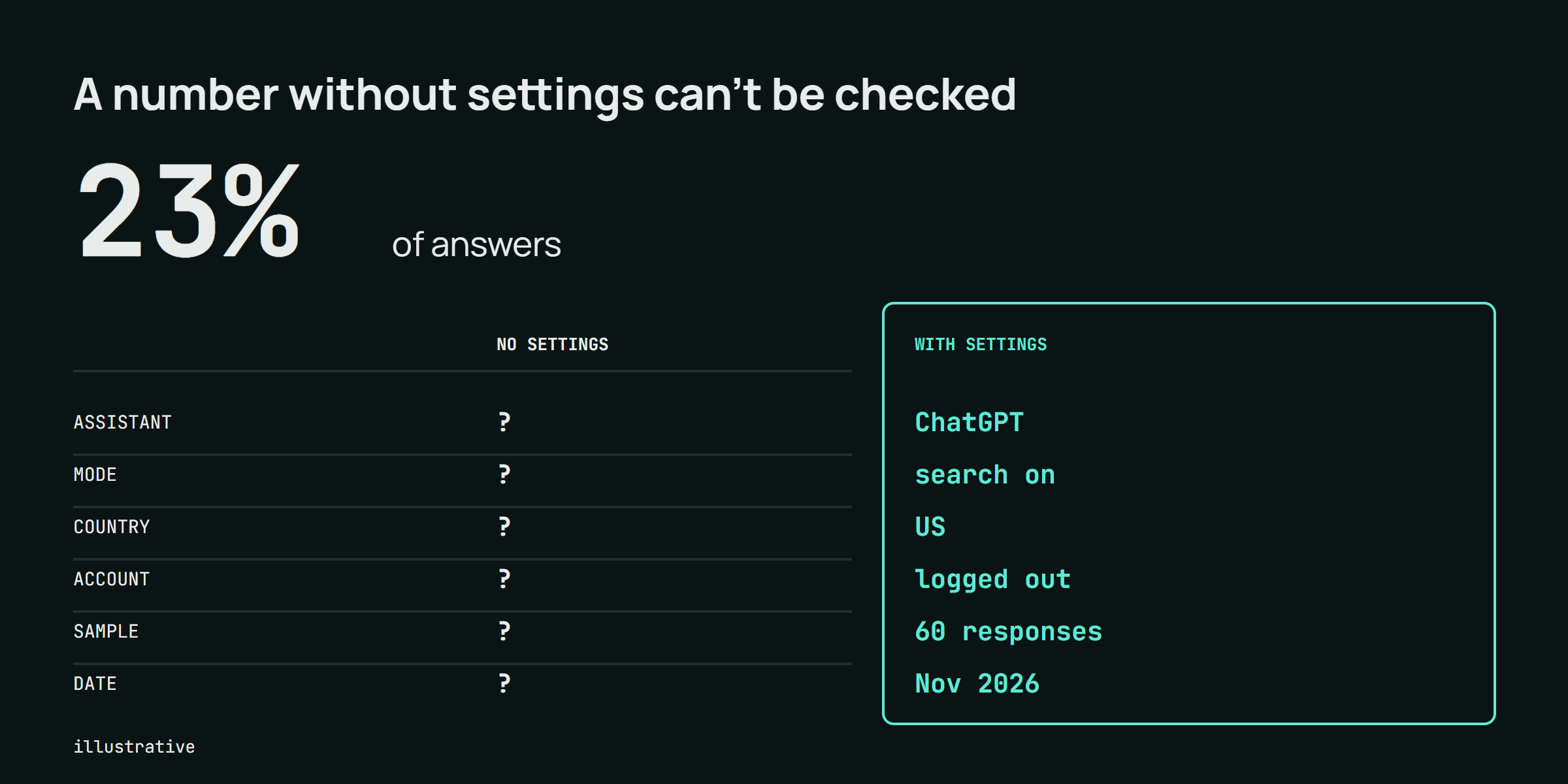
Position and description accuracy are supporting checks. A number without its settings (assistant, search on or off, country, dates, runs per prompt) is an anecdote.
What Is LLM Visibility?
LLM visibility, or AI visibility, is how often and how accurately AI assistants name, link and describe your brand across a fixed set of prompts. The protocol below shows how to measure AI visibility step by step; for the broader picture, see the LLM visibility overview.
Why Is One Run Not a Measurement?
One run is not a measurement because the same prompt returns a different answer almost every time. A single answer is just one draw from a wide spread of possible answers.
SparkToro and Gumshoe.ai tested this in November and December 2025: 2,961 responses to 12 brand-recommendation prompts across ChatGPT, Claude and Google’s AI Overviews. The chance of getting the same list of brands twice was under 1 in 100 for ChatGPT and Google’s AI. The same list in the same order came back less than 0.1% of the time (Search Engine Journal).
How often brands appeared was a more usable signal: Bose, Sony, Sennheiser and Apple showed up in 55% to 77% of 994 answers to 142 differently worded headphone prompts. That supports reporting visibility as a rate over many runs.
The study is not peer-reviewed, was run with an AI-tracking vendor (Gumshoe.ai), and let volunteers use their own settings. It left open how many runs are enough and whether API results match what people see. A University of St. Gallen preprint reaches a similar conclusion independently: at least 7 runs per prompt per day, pooled over 2 to 4 weeks, tested on four engines (Schulte, Bleeker and Kaufmann, arXiv, April 2026).
What Changes an Answer When the Prompt Stays the Same
Five variables move an answer even when the prompt text does not change. Log all five for every run.
- Search on or off. ChatGPT may search the web when it decides the question needs current information, and you can force it (OpenAI help). Search-on and memory-only answers are two different measurements.
- Country. ChatGPT estimates your location from your IP address and can fold it into the search query it writes; a VPN can shift it (OpenAI help).
- Memory. A ChatGPT Temporary Chat can still use saved memories and custom instructions unless you choose “Unpersonalized” before the first message (OpenAI help).
- Query fan-out. Google says AI Overviews and AI Mode may use a query fan-out technique (Google Search Central), and ChatGPT typically rewrites a prompt into one or more targeted searches (OpenAI help). Cited pages come from those hidden queries.
- Date and model version. Assistants and their search features change often, so every figure needs a date.
How Much Error Does a Small Sample Carry?
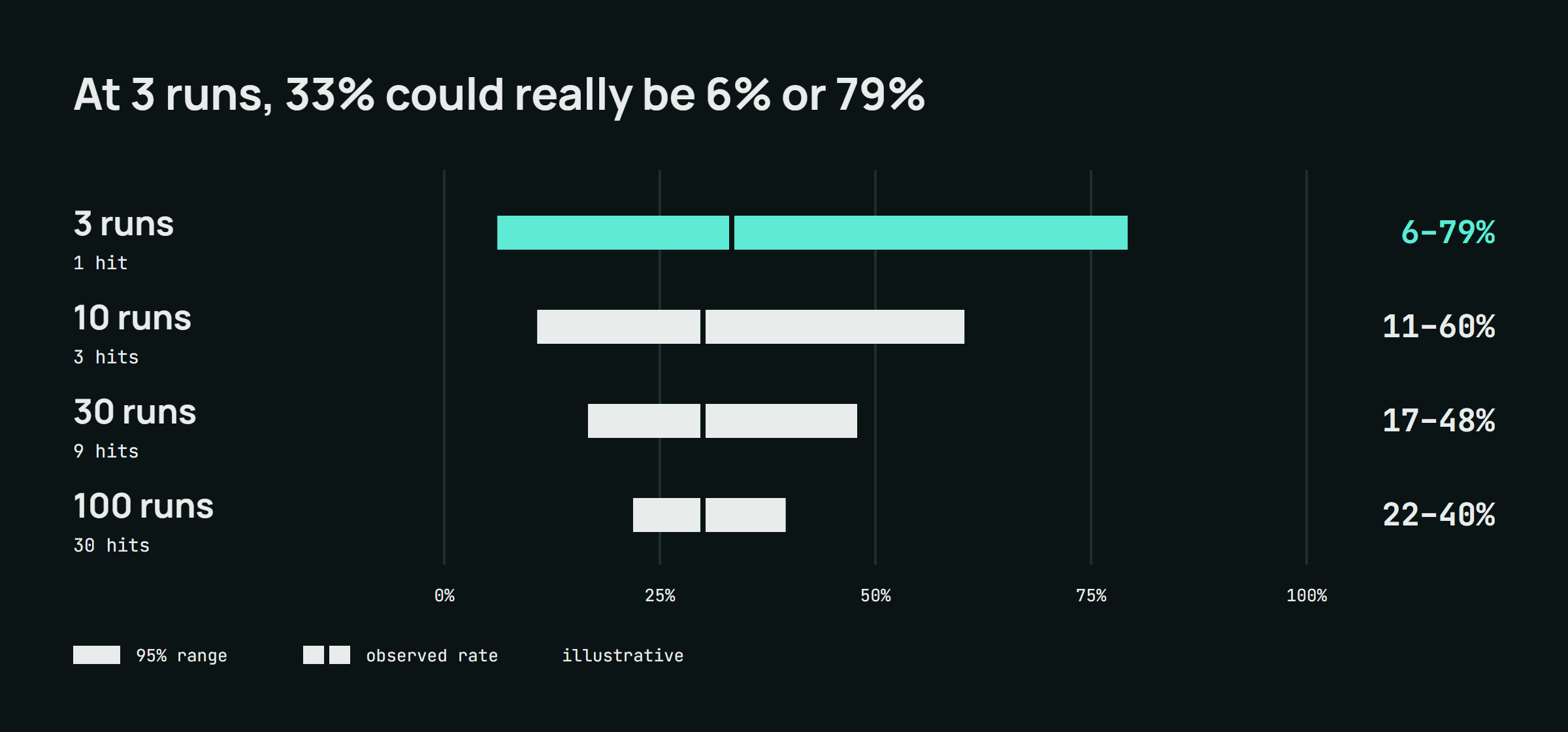
A small sample carries a wide margin of error, so three runs can show a pattern but cannot confirm one.
| Result | Mention rate | 95% range |
|---|---|---|
| 0 of 3 responses | 0% | 0% to 56% |
| 1 of 3 responses | 33% | 6% to 79% |
| 0 of 30 responses | 0% | 0% to 11% |
| 9 of 30 responses | 30% | 17% to 48% |
The range covers run-to-run luck on your exact prompts and says nothing about how much a different prompt set would change the score. To call a month-to-month change real, it should be roughly 1.5 times the margin: for ChatGPT’s 14 of 60 (margin about ±10 points), about 17 points.
The Stive Protocol, Step by Step
The protocol fixes seven things: prompt set, assistants, mode, country, runs, a log of every run, and strict scoring rules.
Step 1: Build a Prompt Set of Four Types
Build the prompt set from real customer wording, in four types, and keep it frozen between measurement periods.
- Vendor choice: “best [service] agency for [segment]”, “who can do [service]”.
- Task: “how to [do the job your service does]”.
- Money and risk: “how much does [service] cost”, “is [service] worth it”.
- Branded: “what is [brand]”, “[brand] reviews”, “[brand] vs [competitor]”.
Take the wording from sales calls, support tickets and the questions in your search data. Write non-branded prompts the way an unprompted customer would type them: no brand name, no leading wording. Mention rate, citation rate and share of voice use non-branded prompts only. Branded prompts are scored separately, for description accuracy, because they name the brand by construction. A baseline set is about 20 prompts and grows as the project matures.
Step 2: Choose the Assistants
Run each prompt in ChatGPT, Perplexity, Claude, Gemini and Google AI Overviews, and report each assistant separately.
Add Copilot and Grok when your buyers use them. AI Overviews do not appear for every query (Google Search Central), so log “no Overview” and report how often one appeared.
Step 3: Fix the Mode and Log It
Record whether web search was on, and report search-on and search-off answers as separate series.
ChatGPT lets you force search on. Claude’s web search is a per-chat toggle on some plans and interfaces, and in the newer Claude experience the assistant decides when to search (Claude help). Gemini and Perplexity differ again, so record what the product did. Use a fresh session with no memory: logged out, or an “Unpersonalized” temporary chat in ChatGPT.
Step 4: Fix the Country and Language
Set the country to your buyer’s market, write the prompts in your buyer’s language, and record both next to every figure.
Step 5: Set the Number of Runs
Run every prompt at least 3 times per assistant; that is the floor at which Stive writes down a number.
Counts and frequency follow the goal, the project stage and the campaign. Across 20 prompts, 3 runs give 60 responses per assistant: enough to see large gaps but too few to see small moves. When a decision rides on the number, the St. Gallen preprint’s 7 runs per prompt per day takes a tool or a script. Re-measure on a fixed schedule; share of voice is reported monthly.
Step 6: Log Every Run
Log the date, assistant and model name as shown, mode, country, the full answer text and the full list of cited sources.
Save the raw answers so anyone can re-score a run later. Expand collapsed source lists before you log citations: a hidden link is a missed citation.
Step 7: Score With Strict Rules
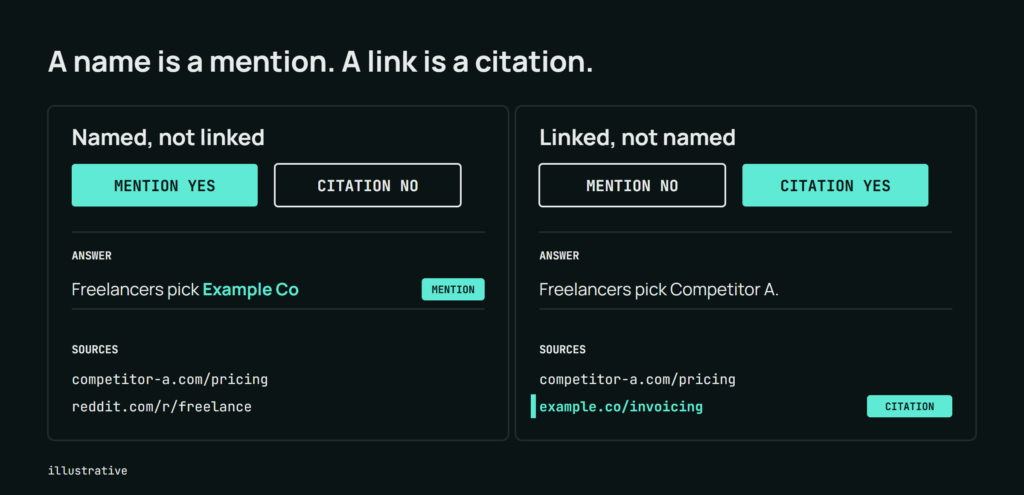
Count a mention when the exact brand name or domain appears in the answer text, and a citation when a link to your domain appears in the sources.
Score the two separately: a brand can be named without a link, and linked without being named. Count each brand once per response. Do not count typos, lookalike names or “a company like yours”. Score a separate Technical Score on its own axis: whether AI crawlers can reach and read the site (robots.txt, how content is delivered, load time). It never feeds into the visibility figures.
Which LLM Visibility Metrics Should a Report Use?
A useful report uses five LLM visibility metrics with written formulas: mention rate, citation rate, AI share of voice, position and description accuracy.
| Metric | Formula | Notes |
|---|---|---|
| Mention rate | Responses naming the brand ÷ all non-branded responses (n/m, m = prompts × runs). Per assistant, then averaged across assistants for the overall score. | Named = exact brand name or domain in the answer text. |
| Citation rate | Responses that link the brand’s domain as a source ÷ all non-branded responses. | Independent of mention rate: a brand can be linked without being named. |
| AI share of voice (LLM share of voice) | Brand mentions ÷ (brand mentions + mentions of 3 to 5 named competitors), counted in the same responses. | Measured monthly. Pick the competitors from your buyers’ shortlist before the first run, keep them fixed and publish the list. |
| Position | Average rank of the brand in answers that list brands. | Order varies run to run. Context only. |
| Description accuracy | Branded responses that match an agreed fact sheet ÷ all branded responses. | Fact sheet: name, category, services, founder, location. |
What Counts as a Good Score?
Judge a score against your own baseline and your named competitors.
Tools define these metrics differently (see below), so a benchmark from one tool does not transfer to another. Share of voice also depends on how many brands you track: with four competitors an even split is 20%, and 100% means no competitor was named in any answer. Read “good” as above the even split and rising on the same prompt set. A composite dashboard score is usable only if you can rebuild it from the prompt set and the rates above.
Vendors Define These Metrics Differently
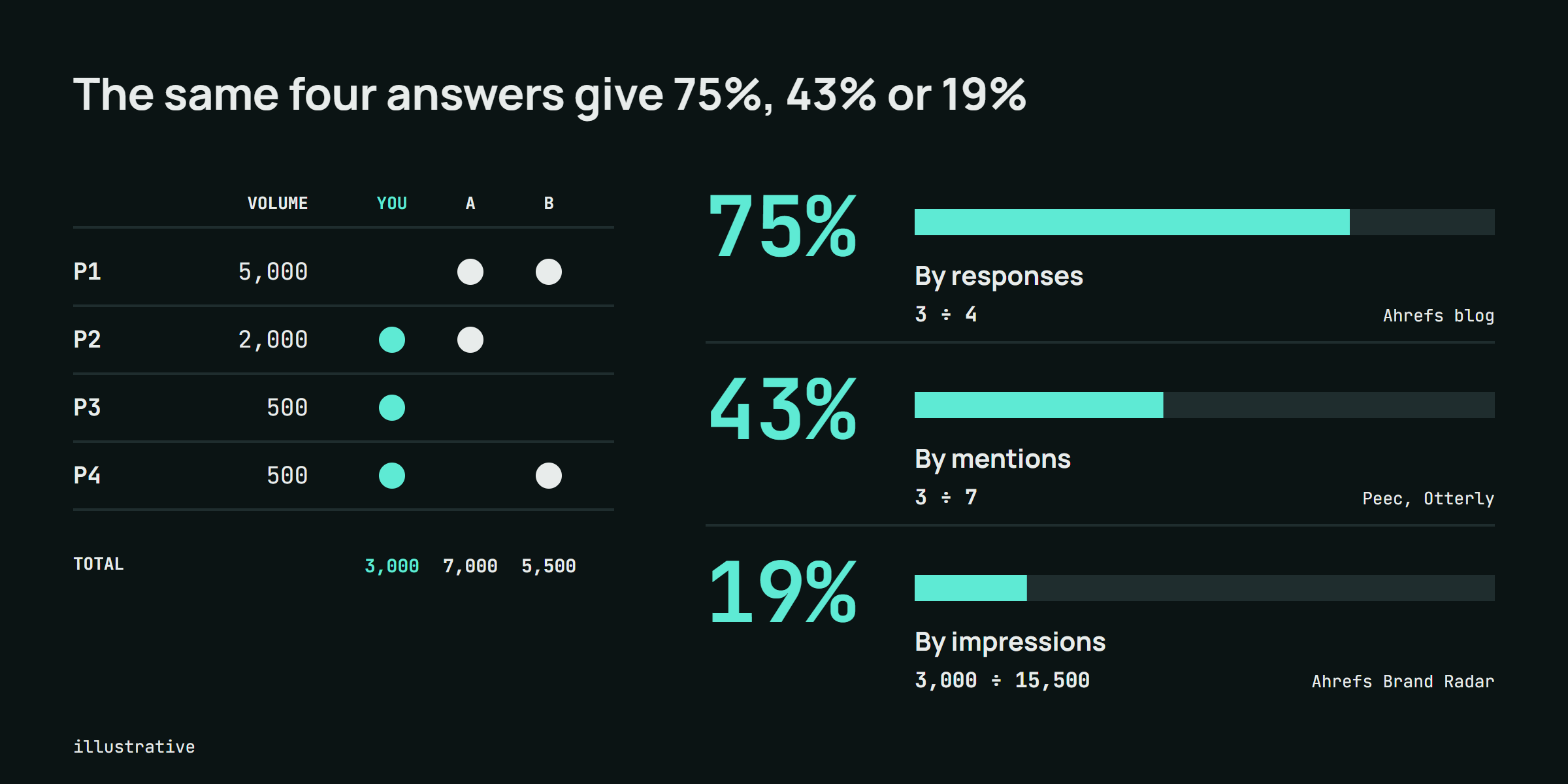
Two tools can report a different LLM share of voice for the same brand, because the definitions differ.
- Ahrefs Brand Radar calculates AI share of voice from impressions, which it estimates by summing Google search volumes of the prompts where a brand appears (Ahrefs help, September 2026).
- Peec AI and Otterly divide your mentions by all brand mentions (Peec docs; Otterly KPI definitions).
- “Citation rate” is not a standard name. Tools report citation counts or domain coverage, so ask which denominator is used.
Glossary: The Terms in This Protocol
A mention is a brand name in the answer, a citation is a linked source, and a run is one prompt in one assistant.
Mention vs citation. A mention is your brand named in the answer text. A citation is a link to your page in the sources. Ahrefs treats them separately because they have different causes and different fixes (Ahrefs, February 2026).
Prompt set. The fixed list of prompts you run every period.
Run and mode. A run is one prompt in one assistant, with its country and date. The mode says whether web search was on or off.
Fan-out query. A search the assistant writes itself after reading your prompt. One prompt can trigger several.
AI share of voice (LLM share of voice). Your mentions as a share of all mentions among you and 3 to 5 named competitors. It is relative: change the competitor list and the number changes.
AI prompt tracking. Re-running a fixed prompt set on a schedule and recording the answers, by hand or with a tool.
AI reach (and “AI audience”). A figure some vendors report with no shared definition. Ask for the formula, the data source and the date range. If the number cannot be rebuilt from a prompt set, do not use it.
Manual Runs or a Tracking Tool: What Can Each Measure?
Manual runs give you control and transparency at small scale; tracking tools give you scale and history, with less control over what happens inside each run.
| Manual runs | Tracking tools | |
|---|---|---|
| Mode and account state | You choose: search on or off, logged out, unpersonalized | Set by the vendor; Peec’s docs say the platform decides which model runs and whether it searches |
| Scale and history | Dozens of prompts, a few times | Hundreds of prompts, daily history |
| Method transparency | Complete, if you log runs | Varies; ask for it |
In AI prompt tracking tools, variance shows up in the daily trend: none of the pricing pages below states several runs per prompt in one scheduled check.
Published prices as of November 2026 (alphabetical, not ranked):
| Tool | Price | What limits coverage |
|---|---|---|
| Ahrefs Brand Radar | Lite $129 (150 checks); custom-prompt packs $50 to $250 per month | 1 check = 1 prompt × 1 platform × 1 location (pricing) |
| Otterly.AI | €29, €189, €489 per month | 16, 120, 403 prompts; 4 of 7 engines on paid plans; a Claude check costs 3 credits (pricing) |
| Peec AI | $95, $245, $495 per month | 50, 150, 350 prompts; 3 models per plan, Claude on Enterprise only; 1, 3, 3 countries; daily (pricing) |
Start with manual runs for a baseline: 20 prompts × 3 runs × 5 assistants is 300 responses per round. Add a tool when you track many prompts, several countries or daily history, and keep a manual run of 10 to 20 prompts to check the tool against what a buyer in your market sees.
Example Scorecard: How to Read the Numbers
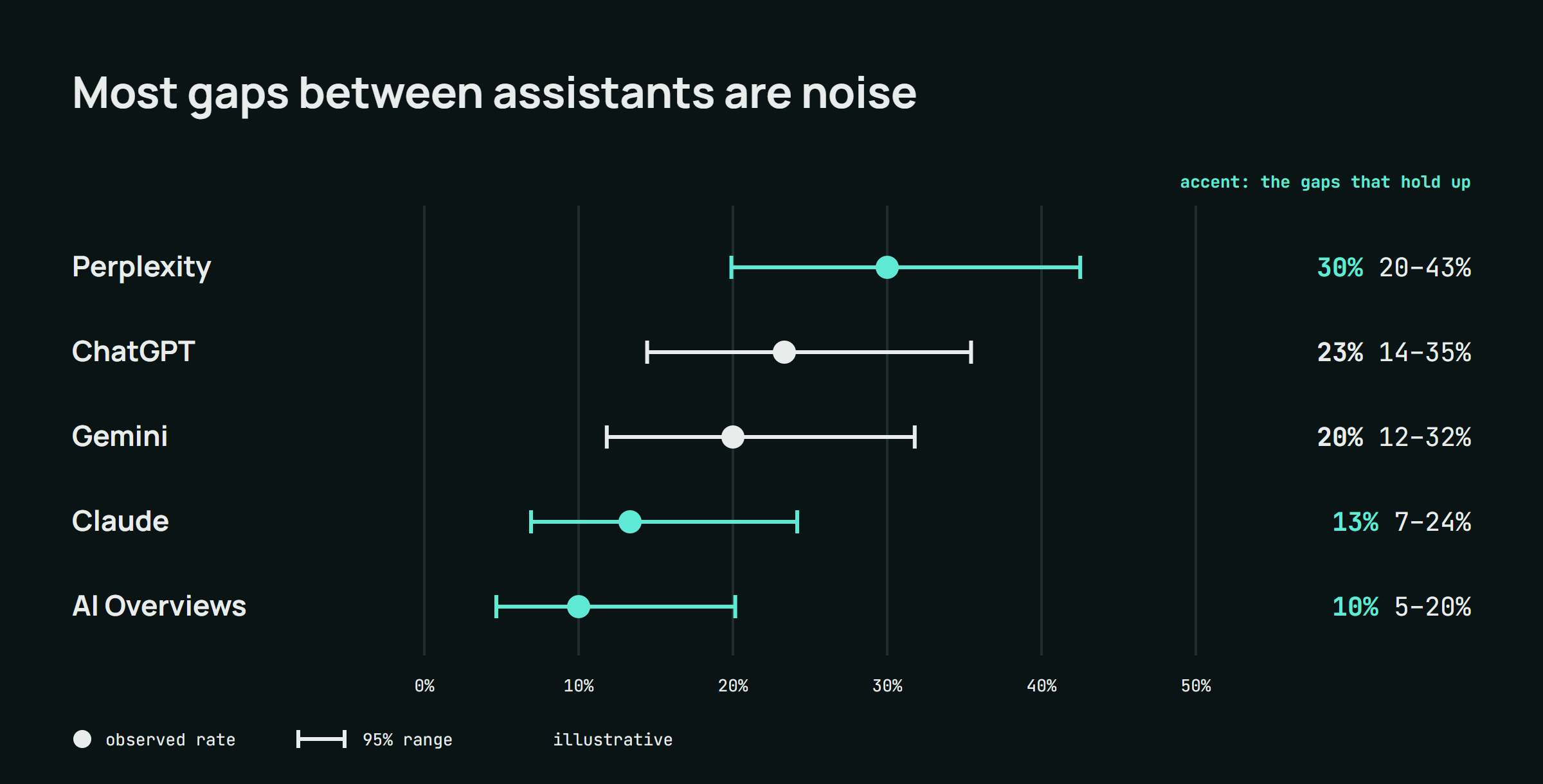
Read the scorecard one assistant at a time, then compare mentions with citations and check each rate against the n/m sample behind it.
Illustrative data, not real measurements. Example Co and competitors A to D are fictional. US, 20 non-branded prompts × 3 runs per assistant (60 responses each), search on where the assistant allows it. Branded prompts are scored separately.
| Assistant | Mentioned (n/m) | Mention rate | Cited (n/m) | Citation rate |
|---|---|---|---|---|
| ChatGPT (search on) | 14/60 | 23% | 9/60 | 15% |
| Perplexity | 18/60 | 30% | 15/60 | 25% |
| Claude (search on) | 8/60 | 13% | 4/60 | 7% |
| Gemini | 12/60 | 20% | 6/60 | 10% |
| Google AI Overviews | 6/60 | 10% | 9/60 | 15% |
| Overall (mean of assistants) | 19% | 14% |
AI share of voice for the same 300 responses, against four named competitors (illustrative):
| Brand | Mentions | Share of voice |
|---|---|---|
| Example Co | 58 | 17% |
| Competitor A | 120 | 34% |
| Competitor B | 96 | 27% |
| Competitor C | 45 | 13% |
| Competitor D | 31 | 9% |
Description accuracy on the branded prompts (illustrative): 51 of 60 responses matched the fact sheet (85%).
How to read it:
- Compare mentions with citations. Claude names Example Co in 8 responses and links its domain in 4; Google AI Overviews links it in 9 and names it in 6. The two move independently, so report both.
- Compare share of voice with an even split. With five brands tracked, an even split is 20%; Example Co’s 17% is just below it.
What Are the Limits of AI Visibility Measurement?
No measurement of AI visibility gives a true, fixed value, because every figure is an estimate from a sample of a changing system.
- Your buyer’s session differs. Personalization, memory and location mean a real buyer can see something different from a clean test profile.
- No proof of revenue. Mention and citation share describe what assistants say. They do not show traffic or sales. Track AI referral traffic in your analytics as a separate, slower signal, and see how to rank in ChatGPT for what to change.
What Should You Require From an Agency or Tool?
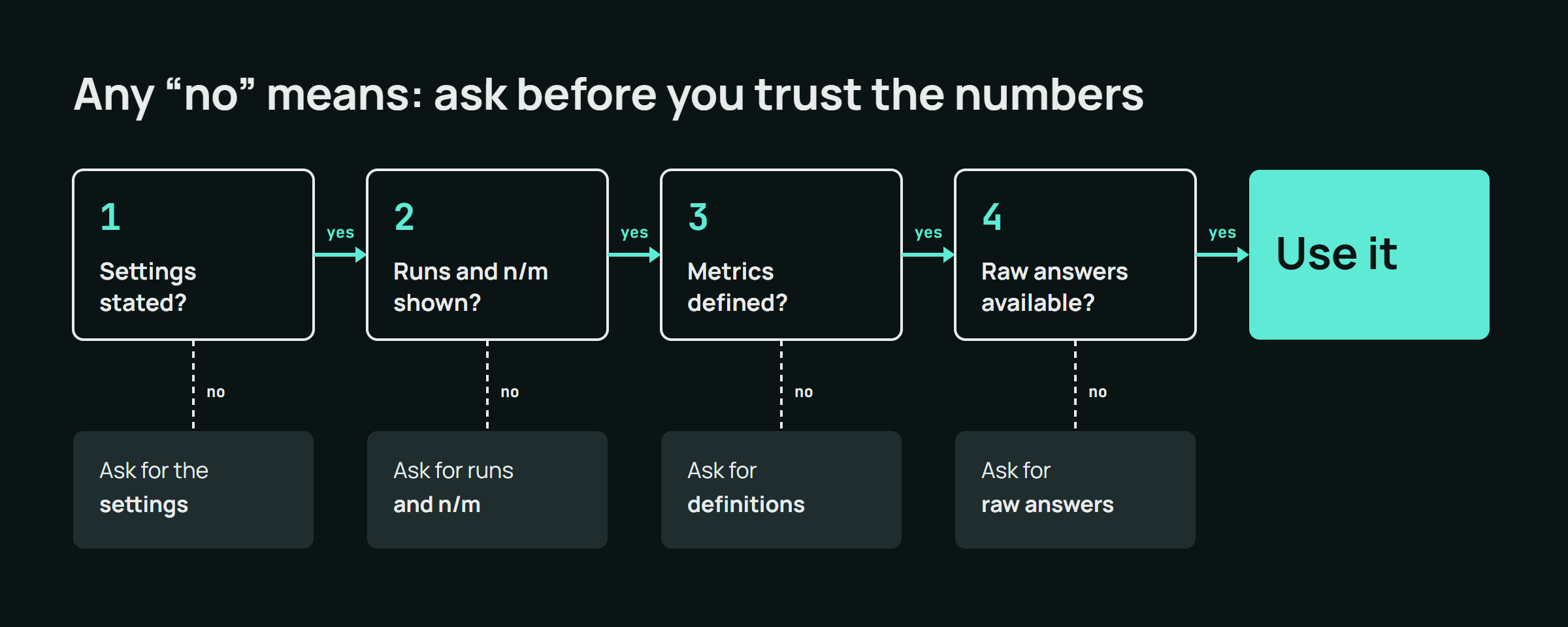
Require six things from any provider of an AI visibility report, and treat a missing one as a reason to ask before you trust the numbers.
- The full prompt set, with prompt types marked, and confirmation that it stayed fixed between periods.
- Runs per prompt per assistant, and the denominator of each rate (prompts or responses).
- Mode, country and account state per assistant: search on or off, logged in or out, memory on or off.
- Dates and the model name shown by each assistant.
- Written definitions of mention, citation, share of voice (including the competitor list) and position.
- Raw answers or an export, so you can re-score a sample yourself.
Sources
- SparkToro and Gumshoe.ai, AI recommendation consistency study: https://sparktoro.com/blog/new-research-ais-are-highly-inconsistent-when-recommending-brands-or-products-marketers-should-take-care-when-tracking-ai-visibility/ ; coverage: https://www.searchenginejournal.com/ai-recommendations-change-with-nearly-every-query-sparktoro/566242/ (January 2026)
- Schulte, Bleeker, Kaufmann, “Don’t Measure Once: Measuring Visibility in AI Search (GEO)”: https://arxiv.org/abs/2604.07585 (April 2026; preprint, not peer-reviewed)
- Ahrefs, mentions vs citations: https://ahrefs.com/blog/monitor-brand-mentions-chatgpt (February 2026); Ahrefs AI visibility metrics: https://help.ahrefs.com/en/articles/15501968-ai-visibility-metrics (September 2026); Ahrefs pricing: https://ahrefs.com/pricing
- OpenAI Help Center: https://help.openai.com/en/articles/9237897-searching-the-web-with-chatgpt ; https://help.openai.com/en/articles/8914046-temporary-chat-in-chatgpt
- Google Search Central, AI features: https://developers.google.com/search/docs/appearance/ai-features
- Claude help, web search: https://support.claude.com/en/articles/10684626-enabling-and-using-web-search
- Peec AI: https://peec.ai/pricing ; https://docs.peec.ai/ ; https://docs.peec.ai/metrics/brand-metrics/share-of-voice.md
- Otterly.AI: https://otterly.ai/pricing ; https://help.otterly.ai/brand-report-kpi-definition
- Confidence ranges: Wilson score interval at 95%, calculated by the author.
About the author
Anastasia Shalepina is a GEO Specialist at Stive and the author of Stive’s guide to LLM visibility.
Stive is an LLM marketing agency that makes brands visible, accurately described and cited in AI assistants such as ChatGPT, Gemini, Perplexity and Google AI Overviews. Services: LLM visibility audits, generative engine optimization (GEO), LLM reputation management and AI visibility tracking.
793